Uniden BC246T · Volume 3
Uniden BC246T — Vol 3: Programming
Analog Motorola Type II + EDACS + LTR trunking
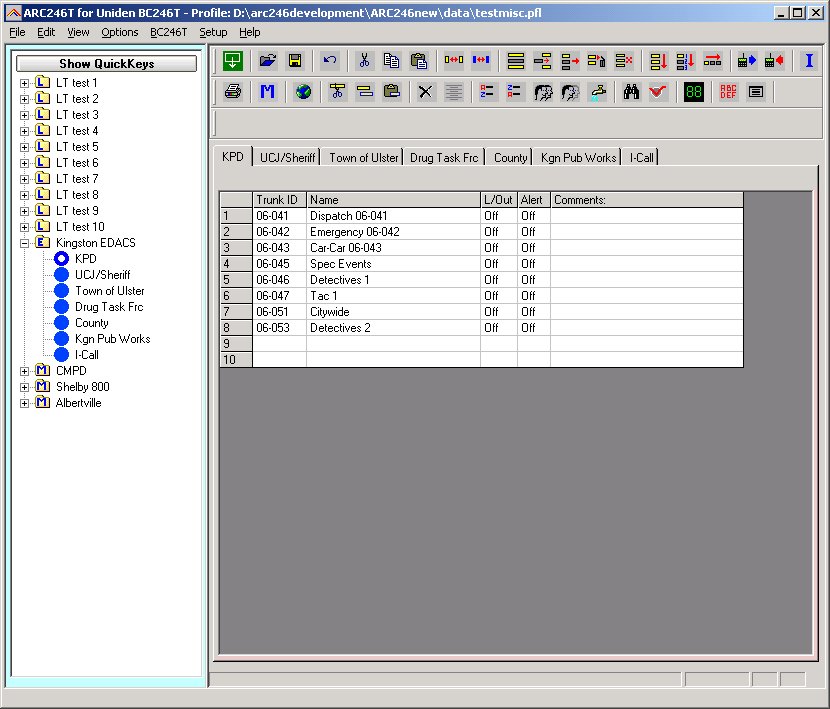
3.1 Programming workflow
Programming is via the mini-USB jack (or 1/8” jack on early production) using one of two third-party PC tools. Uniden’s own first-party software for this radio (BCToolBox / Sentinel-era predecessors) is long out of support — the practical options in 2026 are community-maintained.
PSREdit300 / ARC246 — the two third-party PC programming tools for the 246T. PSREdit300 (from Starrsoft) is the original commercial PC programmer for the early Uniden trunking scanners and supports the 246T’s codeplug format natively. ARC246 (from Butel) is the Butel-family programmer for the same vintage of Uniden scanners. Both are Windows-only, both require a Windows USB driver for the mini-USB jack (the radio enumerates as a Prolific or FTDI USB-to-serial bridge, depending on production run), and both are paid software with the company history covered in Vol 3. Free alternatives (FreeScan, Win246) exist with mixed compatibility — usable for basic conventional-channel loads, weaker for the trunking system + talkgroup hierarchy.
Codeplug format. The 246T’s codeplug is the older Uniden binary format — incompatible with the BCD396XT, BCD536HP, SDS100, SDS200, and every other newer Uniden scanner. The hierarchy is: Systems → Groups → Channels. Trunking systems carry their own talkgroup tables, control-channel frequency lists, and tone settings; conventional groups are simpler flat lists of frequencies with per-channel CTCSS/DCS/mode settings. There is no codeplug-format compatibility with the newer Uniden lineup — moving a 246T codeplug to a BCD396XT is a manual re-entry job, not a file conversion.
Direct front-panel programming is supported and is the right call for adding a single conventional channel in the field, or for one-off frequency edits when you don’t have a laptop. Programming a full county trunked system from the front panel is tedious but possible — Uniden’s manual walks through the menu hierarchy. For initial system loads, use PC software; for incremental field tweaks, use the keypad.
Programming workflow in 2026:
- Pull system data from RadioReference — the legacy database still carries analog Motorola Type II / EDACS / LTR system definitions for the systems still on air. RadioReference can export a 246T-compatible codeplug fragment for systems it knows about.
- Load PSREdit300 or ARC246 on a Windows machine (a VM works fine; the USB-to-serial driver is the only OS-touching piece).
- Connect mini-USB, set the COM port in the software, read the existing codeplug as a backup.
- Edit in the software: add/remove systems, add/remove conventional channels, set scan-list membership, set lockouts.
- Write the codeplug back to the radio. Power-cycle to verify it took.
- Save the codeplug file to disk and version it (see §5).
3.2 Codeplug backups
Codeplug files for this radio live in ../../programs/uniden-bc246t/. Most recent backup: TBD (the radio hasn’t been programmed in some time; the on-radio codeplug is the most current state).
The 246T’s codeplug format is the older Uniden binary format — incompatible with every newer Uniden scanner in the lineup (BCD396XT, BCD536HP, SDS100, SDS200, Homepatrol). Backup discipline is therefore separate from the newer-scanner backup process. The codeplug is small (a few tens of KB), so multiple dated snapshots cost nothing.
Backup convention:
../../programs/uniden-bc246t/
├── codeplug_YYYY-MM-DD_brief-description.246  (PSREdit300 format)
├── codeplug_YYYY-MM-DD_brief-description.btl  (ARC246 / Butel format)
└── README.md                                  (current state, history, edit log)
Restore is the reverse of programming: open the codeplug file in PSREdit300 or ARC246, write to the radio, verify on power-cycle.
Cadence is light — this radio sees few programming edits per year. One backup after any meaningful change is sufficient. The flagships (SDS100 Vol 13, SDS200 Vol 14, BCD536HP Vol 15) get the active programming attention.
Comments (0)