Uniden BC355N · Volume 3
Uniden BC355N — Vol 3: Programming
Compact analog scanner — NASCAR/race-day staple
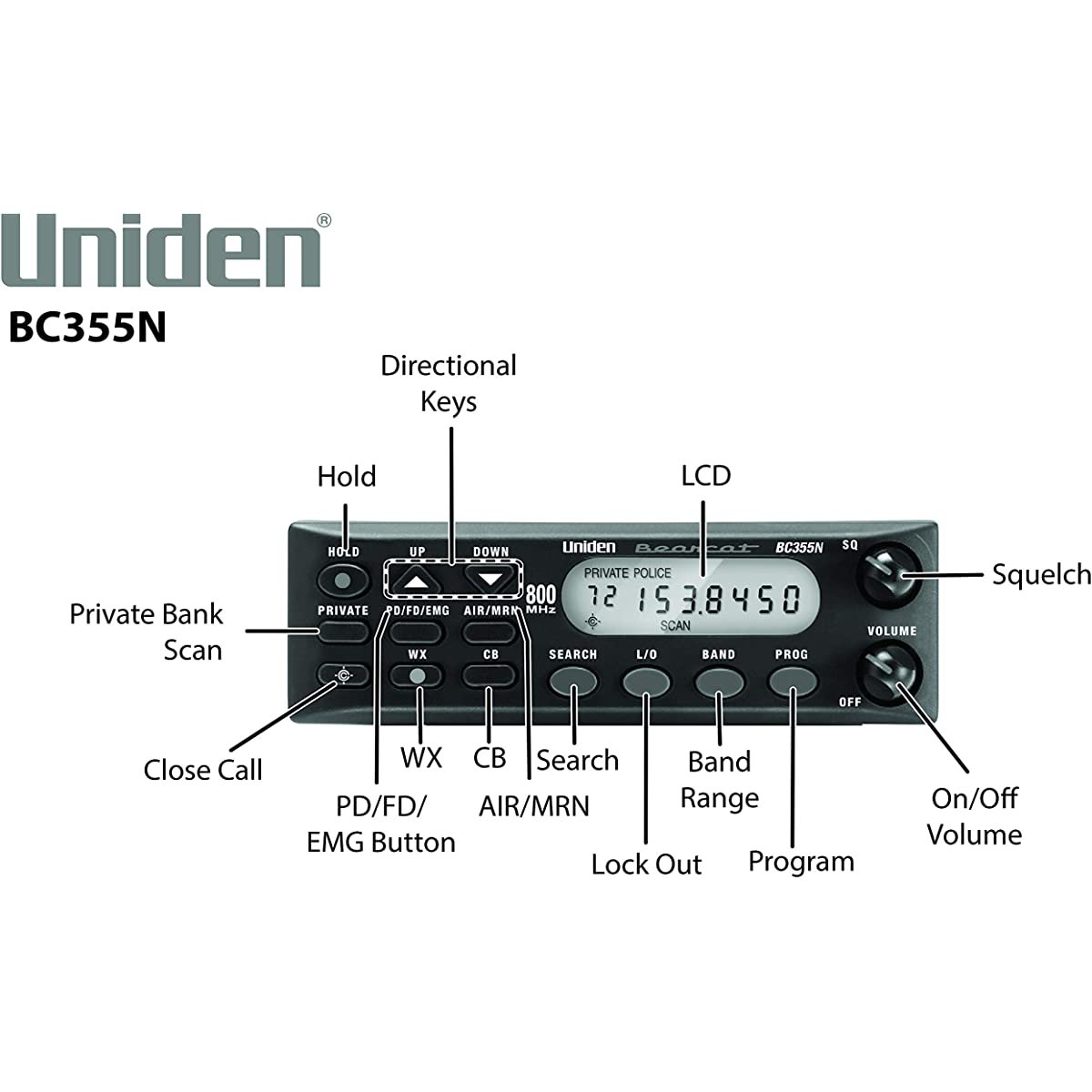
3.1 Programming workflow
Front panel only. The BC355N has no computer, serial or USB connector. The rear panel carries only the ANT (BNC) antenna jack, the EXT SP external-speaker jack and the DC 13.8V power input (owner’s manual, “BC355N Rear Panel”, p. 28). Programming is therefore done entirely from the front-panel keys. No PC programming software exists for the model:
- Uniden’s download listing for the BC355N carries only the owner’s manuals (English, Spanish and French) and no software or firmware.
- The RadioReference wiki page for the BC-355N lists programming from a PC program under “Not capable of”.
- FreeSCAN’s supported-model list does not include the BC355N.
No firmware updates exist either, and the radio has no firmware-version display. There is no port through which an update could be delivered.
What can be programmed. Up to 100 frequencies, one per channel, can be stored in each of three programmable banks, 300 in all: Police/Fire/EMG, Air/Marine and Private. The CB and WX banks are not programmable; the scanner shows ERROR if programming into them is attempted. The display is a 7-segment LCD, so channels carry numbers and frequencies only, with no alpha tags. (Source: BC355N Owner’s Manual in this site’s Reference Library, “Private Bank” and “Programming Frequencies and Channels”, pp. 51–53.)
Getting a frequency onto the display. Any displayed frequency can be programmed. A frequency is brought to the display by scanning a preprogrammed service bank, by running a band search (SEARCH, then BAND to choose one of the 13 search bands), or by stepping with UP and DOWN while in Hold. Close Call can also find strong nearby transmitters. RadioReference lists the frequencies in use in a given area.
Programming a channel (owner’s manual, pp. 52–54):
- With the wanted frequency on the display, press HOLD.
- Press PROG. CH appears and flashes.
- Press the key for the destination bank (PD/FD/EMG, AIR/MRN or PRIVATE). The display alternates between the lowest available channel in that bank and the frequency to be stored. UP or DOWN selects a different channel.
- Press PROG. The frequency is stored and the scanner enters Scan Hold.
- Press HOLD to resume scanning.
Deleting a channel means overwriting it with the null frequency 000.0000: press PROG, hold L/O for 2.5 seconds until 000.0000 appears, press the bank key, choose the channel with UP/DOWN, and press PROG (pp. 54–56).
Program Lock. Holding PROG for more than 2.5 seconds toggles Program Lock; the display shows “on Prg‐Loc” or “OF Prg‐Loc”. While it is on, attempts to program show “Prg‐Loc” (p. 57).
3.2 Keeping a record of the programming
With no computer interface there is no codeplug file to read out, save or restore. The programmed channel list exists only in the radio’s memory, so a written record is the only backup:
- Keep a list of each programmed channel: bank, channel number, frequency and what it carries. A plain-text or Markdown file under
../../programs/uniden-bc355n/suits this, with a printed copy kept near the radio. - Update the list after each programming session, and before any race weekend or trip that brings a new set of frequencies.
- Clear All Memory erases every programmed channel: the scanner is turned on while PROG and L/O are held, and the band plan resets to USA (p. 57). Re-entering channels afterwards is done by hand from the written list.
Comments (0)