Uniden SDS100 · Volume 2
Uniden SDS100 — Vol 2: Operations
TrueIQ baseband, P25 Phase II, ProVoice option, DMR/NXDN
2.1 Operating modes
The SDS100’s RF coverage, modulation support, and trunked-system handling are the depth of the radio. The signal-processing chain is the same end-to-end for every mode — RF-front-end → mixer to baseband → IQ digitization → DSP demodulation in firmware — but the demodulator selected for any given channel depends on the channel’s Modulation parameter or the trunked-system definition.
2.1.1 RF coverage
The full tuning range, with the US-market mandatory cellular gaps in place per 47 CFR §15.121 (consumer scanner gear must not tune cellular bands):
Table 1 — The full tuning range, with the US-market mandatory cellular gaps in place per 47 CFR §15.121 (consumer scanner gear must not tune cellular bands)
| Range | Coverage | Notes |
|---|---|---|
| 25 - 512 MHz | Continuous | HF tail / 6m amateur, marine VHF, public-safety VHF, federal VHF, MURS, amateur 2m, FRS/GMRS, public-safety UHF, federal UHF, amateur 70cm |
| 758 - 824 MHz | Continuous | 700 MHz public-safety band |
| 849 - 869 MHz | Continuous | (gap 824-849 = uplink cellular A/B, 869-894 = downlink cellular A/B — both blocked by §15.121) |
| 894 - 960 MHz | Continuous | 900 MHz public-safety, 900 MHz business LMR, amateur 33cm |
| 1240 - 1300 MHz | Continuous | Amateur 23cm |
The HF tail (25-30 MHz) is for legacy 10m / business HF / CB-adjacent monitoring — not the prime use case. The 700/800/900 MHz public-safety bands are the prime use case for any modern scanner; the SDS100’s tuning range covers all current US public-safety allocations. The 1240-1300 MHz band is included because of the amateur 23cm allocation; the band is sparsely used (microwave amateur work and a small number of repeaters) but the coverage is appreciated when it is needed.
The SDS100 does not tune below 25 MHz; for HF/SWL monitoring the Tecsun PL-880 (Vol 11) is the right radio. The SDS100 does not tune above 1300 MHz; for L-band (1.5 GHz aero datalinks, ADS-B at 1090 MHz) the radio covers it; for S-band (2.4 GHz Wi-Fi, ISM) it does not.
2.1.2 Favorites lists — the new scan-list architecture
The single biggest operational difference between the SDS100 and previous Uniden scanners (BCD396XT and prior) is the favorites list architecture. Older scanners used “scan lists” — a flat list of memory channels, with bank-grouping to organize them. The SDS100 uses a hierarchical model:
Favorites list (256 max, each named)
  └─ System (within a favorites list, multiple systems per list)
      └─ Site (for trunked systems, multiple sites per system)
          └─ Channel/Talkgroup (within a site, the actual frequencies/TGIDs)
A favorites list is a named collection of systems — e.g., “Home county”, “Travel - NYC”, “Weather”, “Aviation 118-137”. You can enable or disable an entire favorites list with a single keypress: each list can be given a Quick Key from 0 to 99, and the number keys toggle them during scan (up to 256 favorites lists can be monitored). This is the killer ergonomic feature — if you have a “Weather” list always loaded but only want to hear it when there is a watch in effect, you toggle quick-key-9 to bring it in or take it out without editing any underlying configuration.
A system within a favorites list is one of: a trunked-radio system (P25 Phase I, P25 Phase II, DMR Tier II, NXDN 4800/9600, MotoTRBO Connect Plus, EDACS narrowband, EDACS wideband, LTR Standard, LTR Multi-Net), or a conventional analog/digital channel group. Trunked systems carry per-talkgroup configuration (Alpha tag, priority, alert tone, alert color); conventional systems carry per-frequency configuration (Alpha tag, modulation, CTCSS/DCS/NAC, priority).
A site within a trunked system is one of the physical transmitter sites that participates in the system — for a multi-site simulcast system, each transmitter site has its own control channel frequency, and the scanner needs to know about each one to follow the system as the user (or the talkgroup chatter) moves between sites. Sites can be enabled/disabled individually (useful for ignoring distant simulcast sites that create interference at your location) and can be tied to GPS coordinates so the scanner auto-enables them when you are within range and disables them when you leave.
A channel (within a conventional system) or talkgroup (within a trunked system) is the actual unit of monitoring — a frequency + modulation for conventional, or a TGID (talkgroup ID, a 16-bit integer) + system context for trunked. Each channel/talkgroup has its own Alpha tag (display name), priority flag, alert tone, alert color, attenuator setting, and record-on-hit flag.
The hierarchy is deeper than older scanners but more powerful — you can hold an entire metropolitan area’s public-safety, business, amateur, and aviation systems in a single favorites list, and toggle the whole thing in or out with one keypress. The trade-off is configuration complexity: you do not program the SDS100 by hand-entering frequencies the way you did a BCD396XT; you use ProScan or Sentinel and pull pre-built system definitions from RadioReference.
2.1.3 Modulation support
The SDS100 demodulates:
- Analog FM — wideband (~25 kHz) and narrowband (~12.5 kHz) — the workhorse for legacy public-safety, business LMR, and amateur 2m/70cm
- Analog AM — for the 118-137 MHz aero band and the 225-400 MHz mil-air band
- P25 Phase I (C4FM) — 12.5 kHz channels, single-slot, the original APCO-25 standard
- P25 Phase II (H-CPM TDMA) — 12.5 kHz channels carrying two simultaneous voice slots via TDMA, the current standard for new US public-safety systems
- DMR Tier II — 12.5 kHz channels, 2-slot TDMA, the dominant standard for business LMR worldwide (paid DMR key, which also unlocks MotoTRBO Capacity Plus/Connect Plus, DMR Tier III, and Hytera XPT)
- NXDN 4800 — 6.25 kHz channels, single-slot, used by some utilities and railroads (paid NXDN key, which covers both 4800 and 9600)
- NXDN 9600 — 12.5 kHz channels, single-slot, mostly business
- MotoTRBO Connect Plus — Motorola’s proprietary trunking control overlay on DMR Tier II, common for large commercial fleets (included in the DMR key)
- EDACS narrowband and wideband — legacy 800 MHz public-safety trunking (analog by default; ProVoice digital with paid upgrade)
- ProVoice / EDACS ProVoice — paid upgrade key (about $50 from my.uniden.com as of 2025–26; per-radio, tied to the scanner’s serial number — see Vol 5 — Upgrades & Firmware); decodes the digital voice variant used on some legacy EDACS systems, mostly in the southeastern US
- DMR with encryption keys loaded — the SDS100 itself does not decrypt encrypted DMR; encrypted talkgroups show as encrypted in the display and play no audio. (Decrypting encrypted public-safety traffic is illegal in the US even passively per 18 USC §2511 — the radio does the right thing by not implementing it)
The radio does not demodulate: P25 Phase II encryption (same legal reason), TETRA (European public-safety standard, not used in US), DMR Tier III (lightly-deployed Motorola variant), iDEN (extinct Nextel system), Tetrapol (French/EU), or any modern cellular protocol (GSM/UMTS/LTE/NR — irrelevant to a scanner).
2.1.4 LSM and the simulcast story
Linear Simulcast Modulation (LSM) is the single feature that most differentiates the SDS100 from prior-generation scanners. Legacy P25 Phase I and II uses C4FM (four-level continuous-phase FSK) — works fine on a single-site system, but on a simulcast system where multiple transmitter sites emit on the same frequency with slight time offsets, the partial-overlap RF creates phase chaos that the C4FM demodulator hears as garbled audio. LSM pre-distorts the waveform at each transmitter site to compensate for multi-site combining; the scanner applies an inverse-LSM correlator before the C4FM demodulator. The SDS100 does this automatically (Auto Modulation setting on a P25 system enables LSM-detect-and-handle).
The result: on a simulcast P25 system within range of two or more co-channel transmitter sites, the SDS100 hears clean audio where the BCD396XT, BCD536HP, or any non-TrueIQ scanner hears garbled mess. Most major US metropolitan areas now run LSM simulcast P25 for primary public-safety; if you are within ~50 miles of a major metro, you probably need an LSM-capable scanner. The corner case: on a few unusual systems the auto-detect picks wrong; manually set LSM to On or Off rather than Auto. The RadioReference wiki for any specific system flags this when it applies.
2.1.5 The legal envelope (scanner edition)
The SDS100 is receive-only — no transmit hardware, no FCC type-acceptance issue around emission. The legal question is what you may legally monitor:
- Public-safety bands (police, fire, EMS, federal) — legal to monitor in most US jurisdictions; a few states (CA Vehicle Code §11220, NY Penal Law §397) restrict carrying a scanner in a vehicle even though monitoring itself is legal — Michigan is permissive
- Aviation, marine, business LMR, amateur, weather, GMRS, FRS — legal to monitor everywhere in the US
- Cellular bands — the §15.121 hardware gap enforces 18 USC §2511 (ECPA) on the scanner-hardware side; cannot intentionally intercept cellular content
- Encrypted public-safety traffic — legal to receive the encrypted signal; illegal to decrypt it (18 USC §2511); the SDS100 does the right thing by not implementing decryption
Cross-reference Vol 4 §3 (Receive-only legal envelope) ↗ and Vol 1 §4 (License envelope) ↗.
2.1.6 Squelch, attenuator, and tone-controlled access
The SDS100 supports the full standard set of squelch and access tone systems:
- Standard FM squelch — RSSI-based, threshold set by the squelch knob
- CTCSS (Continuous Tone-Coded Squelch System) — 50 standard sub-audible tones (67.0 - 254.1 Hz); the scanner only un-squelches when the configured CTCSS tone is detected on a received signal
- DCS (Digital-Coded Squelch) — 104 standard codes; same idea, digital sub-audible code instead of analog tone
- NAC (Network Access Code) — P25-specific, 12-bit code carried in the P25 framing; used to differentiate P25 systems on shared frequencies
- Search NAC — the scanner can be set to learn the NAC of any P25 transmission heard, useful for discovery
Each channel can be configured for a specific access code (filter mode) or for “Search” (display the access code of any received signal and pass audio for all). In Search mode, the radio is essentially documenting what is on a frequency rather than filtering for a known user.
The attenuator is per-channel, 20 dB nominal, useful in three situations: strong-signal overload (a nearby paging transmitter dragging the front end into compression and creating intermod), multi-site simulcast where a too-strong nearby site is interfering with the LSM decode of a more-distant target site, and antenna-substitution testing (where you have switched to a larger antenna and want to roll back the gain to match the smaller-antenna behavior).
2.1.7 GPS-based site enable/disable
For trunked systems with multiple physical sites, each site can be tagged with a GPS coordinate (lat/lon) and radius (or rectangles). With an external GPS receiver connected (the SDS100 has none built in), the scanner enables the site when its GPS fix shows you within the radius, and disables it otherwise. This is the killer feature for road-trip scanning: pre-load a multi-state set of public-safety systems (one favorites list per state), tag every site with its GPS bounds, and the radio auto-selects which systems and sites are active as you drive across state lines. The RadioReference database carries GPS coordinates for every documented site; ProScan and Sentinel both import them automatically when you pull a system definition.
Without a GPS receiver — including all static home or office operation — set your location by ZIP code or latitude/longitude and the radio scans as if it had a fix at that location.
2.1.8 Discovery and Close Call modes
Two non-trunked scan modes deserve mention:
Discovery mode sweeps a frequency range, logs every hit (with frequency, signal strength, modulation, and timestamp) to the SD card, and continues sweeping. Useful for finding what is active in a new area — set Discovery to 450-470 MHz business UHF in an unfamiliar city, leave the radio running for a few hours, then review the log to see what business systems are transmitting nearby.
Close Call is Uniden’s near-field detector — the radio listens for any nearby transmitter within ~50-200 feet (depending on the transmitter’s power and the SDS100’s antenna), regardless of what frequency it is operating on, and auto-tunes to it. Useful for finding the security guard’s radio frequency at an event, or for identifying what frequency a nearby paging transmitter is on. Close Call’s range is far enough that it can be a nuisance in dense RF environments (every nearby cell phone hand-shake will trigger it); it works best in low-RF environments where the targets are within direct sight.
2.2 Field use
2.2.1 Antenna pairing
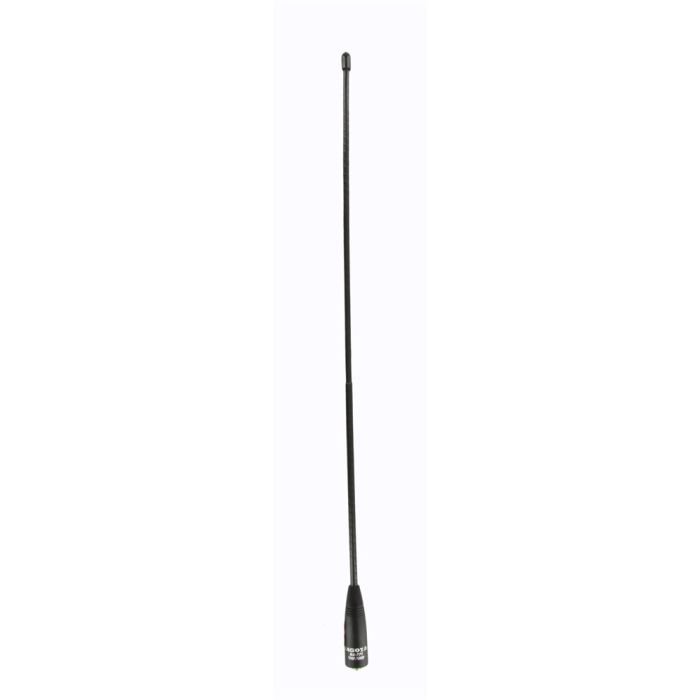
The stock antenna is a Uniden-branded SMA-male rubber duck, approximately 15 cm (6 in) long, with a broadband design that compromises gain on every band in favor of covering the full 25-1300 MHz tuning range. Performance is mediocre by design: the OEM rubber duck is electrically short on VHF (where 1/4λ = 50 cm at 150 MHz, vs 15 cm physical length), close to 1/4λ at 460 MHz UHF (where it performs best), and inefficient again at 700-900 MHz (where the design is in a higher-order resonance with reduced gain).
For incident-portable use where the radio is on the belt, the stock rubber duck is acceptable but not ideal. The standard upgrade is the Diamond SRH77CA dual-band whip — approximately 40 cm (16 in) long, SMA-male, broadband VHF/UHF — which adds ~3-6 dB of effective sensitivity across the 144-470 MHz range that covers most public-safety, amateur, and business VHF/UHF. The SRH77CA is the same antenna recommended for the AnyTone D878UVII and the Yaesu VX-8DR; it covers the radios cross-functionally. Mid-2026 pricing approximately $25-30 from Ham Radio Outlet or DX Engineering. Cross-reference Antennas Vol 9 (Portable & mobile monopoles) for the full treatment of handheld-scanner antenna upgrades.
For 700-900 MHz public-safety reception specifically, the SRH77CA is still better than the stock antenna but is not optimized for the band; if your primary use case is 800 MHz public-safety, a dedicated 800 MHz whip (Diamond SRH519, ~$25 mid-2026) is the better choice. For 23cm (1240-1300 MHz) reception, no handheld whip is well-optimized; the rubber duck is fine since you are not going to do serious 23cm monitoring from a handheld.
For base-station scanning at home (the SDS100 sitting on the desk or in a car cradle), the right answer is a discone outdoor antenna — the Diamond D-130J (~$130 mid-2026) is the standard. Mount the discone outdoors with a clear sky view, run LMR-400 down to the desk (50-foot run is ~1.3 dB loss at 460 MHz, ~2.6 dB at 900 MHz; the discone’s broadband gain mostly offsets), terminate in SMA-male at the radio end. Cross-reference Antennas Vol 12 (Discone & wideband) for the discone-design and -installation deep dive, and Antennas Vol 29 (Use-case Matrix) for the explicit SDS100-antenna pairing matrix with all four pairing tiers.
2.2.2 Posture — incident-portable and EDC
The SDS100 is carried in two postures:
Incident-portable — at an event (parade, concert, neighborhood emergency), pulled out of the bag and onto the belt with a speaker-mic. Favorites list set to the local public-safety + the event-specific frequencies (event radios are usually business UHF 460-470 MHz with CTCSS, easy to find with Close Call if not pre-programmed). Volume up enough to hear over crowd noise. Battery usually fresh; expect 8-10 hours of use.
Everyday-carry — in the day bag for trips out of town. Favorites list set to whatever metropolitan area is current (GPS-based site enable handles the cross-state-line drift automatically). Volume low; mostly in scan-and-sleep mode. Battery usage minimal; one charge lasts the trip.
2.2.3 Battery management
Runtime depends on the battery generation (early BPS100 packs are 3600 mAh; current packs 5400 mAh), backlight level, and volume. Practical habits:
- For a full-day event, carry a spare BPS100 — swapping means removing the back cover
- Lower the backlight (Func + 5) and turn on Battery Save (Menu → Settings → Battery Options) for long monitoring on one conventional channel
- For multi-day trips, bring a USB charger or power bank rated 1 A or more on the mini-USB port — at that rating the radio can scan and charge at the same time
- Replay and recording need the battery installed, even when running from USB power
2.2.4 Location without GPS
The SDS100 has no internal GPS, so there is no GPS lock to wait for. Location-based scanning works either from an external GPS receiver (Uniden’s BC-SGPS kit, on the mini-USB port) or from a location set by ZIP code or coordinates. In a vehicle, the external GPS keeps site selection current as you drive; everywhere else, a set location is simpler and uses no extra power.
2.2.5 Common gotchas
- “Hearing everything as garbage” — LSM detection confused on a simulcast P25 system. In the system menu, force
Modulation TypetoLSMorC4FMinstead ofAuto. If you cannot tell which system is affected, disable favorites lists with quick-keys and re-enable systems one at a time - “Hearing nothing on a known-active system” — check favorites-list enabled (active-quick-key bar at bottom of display), system enabled within the list, and at least one site enabled (location control can silently avoid all sites if your set location or GPS position is outside the system’s range)
- “Audio drops out mid-transmission” — radio is hopping between simulcast sites where one is weaker. Site indicator top-right; if it is hopping rapidly, force-select the dominant site (Site Lock = On)
- “SD card is full” — recordings accumulate; delete old recording sessions (press and hold Replay → review → delete). To prepare a new card, format it with the SD Association’s SD Memory Card Formatter and then run Sentinel’s Clear User Data on it — the scanner has no format command of its own (see Vol 5 — Upgrades & Firmware)
- “Radio is hot to the touch” — TrueIQ baseband processing is computationally expensive; warm during active scanning is normal, not a fault
- “Battery life is suddenly much worse” — first suspects: backlight level, a weak USB charging source (below 1 A), or an aging battery pack
Comments (0)