Uniden BCD536HP · Volume 3
Uniden BCD536HP — Vol 3: Programming
P25 Phase II, GPS, Wi-Fi remote via ProScan
3.1 Programming workflow
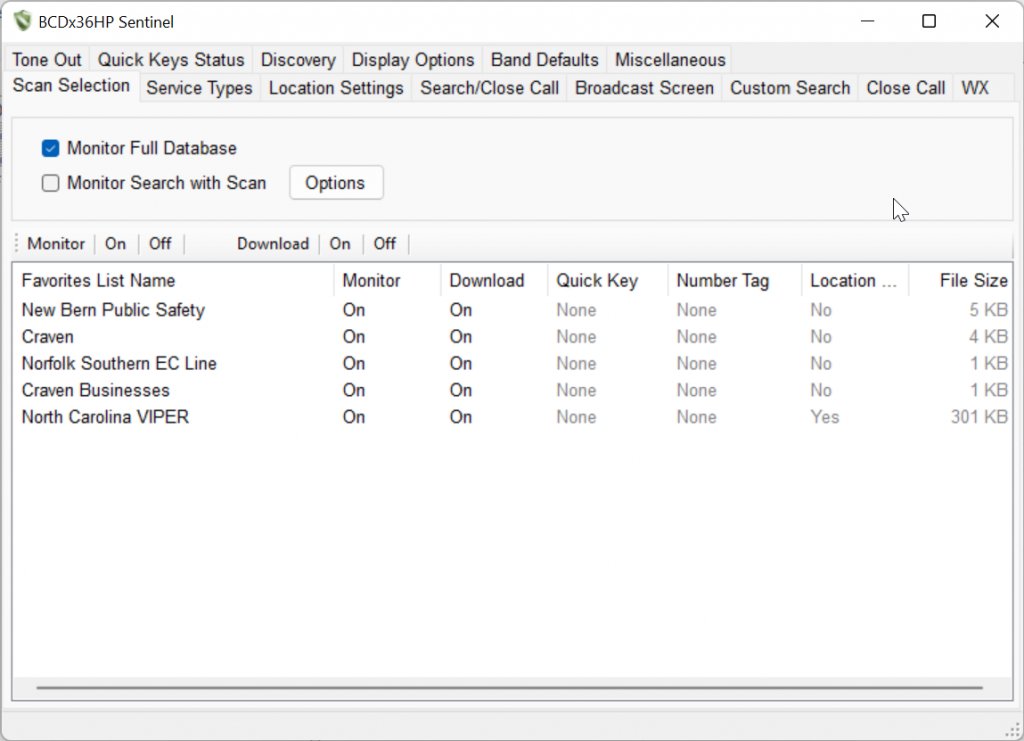
The BCDx36HP family is programmed via Sentinel — Uniden’s free CPS for this generation. This is a different tool from ProScan, which is the third-party paid CPS that became Uniden’s official tool for the SDS line; see Vol 3 for the deep programming-software treatment. Both work with the BCD536HP, but Sentinel is the canonical and the only one needed for routine programming and firmware updates.
The Sentinel architecture is microSD-centric. Unlike older Uniden scanners where the codeplug lived in internal flash and you wrote it over USB, the BCD536HP keeps its entire active configuration — Favorites Lists, Profile, Discovery results, Activity Log — on the microSD card. Sentinel reads and writes the microSD card directly: when the scanner is connected via USB and put into Mass Storage Mode (Menu → USB → Mass Storage), the SD card mounts as a removable drive on the host PC, and Sentinel manipulates the files there.
The file layout on the SD card:
[SD root]/
├── Profiles/                  ← named Profile folders, each is a complete codeplug
│   ├── My_Profile/
│   │   └── Profile.dat        ← the binary codeplug
│   └── Backup_2026-05-24/
│       └── Profile.dat
├── FavoritesLists/            ← named Favorites Lists (modular scan groups)
│   ├── Local_Public_Safety.fls
│   ├── Aircraft_Bands.fls
│   └── Marine_VHF.fls
├── DiscoveryLog/              ← results from Discovery scans
│   └── Discovery_2026-05-20.dlg
├── ActivityLog/               ← timestamped channel-hit logs
│   └── Activity_2026-05-24.log
├── Audio/                     ← per-channel audio recordings
│   └── (timestamped .wav files)
└── Screenshots/               ← Func+Hold captures the screen
    └── (timestamped .bmp files)
The programming flow:
- Subscribe to RadioReference Premium (~$30/yr, mid-2026). This is the canonical North American frequency database. Sentinel ingests RadioReference data directly via your credentials.
- Download to Sentinel: Open Sentinel, point it at your county/region or specific agencies, and pull the relevant systems/sites/talkgroups into your local database.
- Build Favorites Lists: Sentinel’s “Favorites Lists” are modular scan groups. A typical setup has one list per use case — “Local Public Safety”, “Aircraft”, “Marine”, “Ham VHF/UHF Repeaters”, “Travel-OH-PA-corridor” — and the scanner scans any combination of enabled lists.
- Write to the scanner: With the BCD536HP in Mass Storage Mode, click “Write to Scanner” in Sentinel. The Profile + Favorites + DB are pushed to the SD card.
- Eject and reboot: Disconnect USB cleanly, then power-cycle the scanner. On startup, it reads the new Profile and is ready to scan.
Firmware updates are also through Sentinel: it checks Uniden’s servers for new firmware on launch, downloads the .bin, and pushes it to the scanner over USB (Mass Storage Mode). Always back up before firmware update (see §5 — the Sentinel “Profile Backup” feature creates a dated copy of the entire Profiles + FavoritesLists tree).
Where Sentinel data lives on the bench:
- The Sentinel application itself: not stored in the repo (install from Uniden’s site).
- Archived Sentinel installer:
../../programs/uniden-misc/BCDx36HP_Sentinel_Version_3_00_01.zip— a known-good version stashed for offline reinstall, in case Uniden ever pulls the download (they did pull older Sentinel versions for the BC-series in 2019, motivating the local archive). - Live Sentinel data dir (Profile + FavoritesLists + ActivityLog + DiscoveryLog snapshots) — backed up to
../../programs/uniden-misc/BCDx36HP-Sentinel-data/. This directory mirrors what’s on the SD card, periodically refreshed (post-edit). See §5 (Codeplug backups).
The big workflow advantage of the Sentinel-via-SD-card design vs. older serial CPS: the SD card is the codeplug. If you have multiple BCDx36HP units (only one is owned here, but the architecture supports it cleanly), you can clone codeplugs by simply swapping SD cards. If the scanner’s internal flash ever corrupts, a known-good SD card restores it on power-up. And the SD card lives outside the scanner — back it up by sticking it in any PC’s card reader.
3.2 Codeplug backups
Codeplug files for the BCD536HP live at:
../../programs/uniden-bcd536hp/— primary backup tree for this specific scanner. Includes dated snapshots of the Profile.dat + Favorites Lists.../../programs/uniden-misc/BCDx36HP-Sentinel-data/— the shared Sentinel-data backup directory (covers both the 536HP and the 436HP family — no 436HP is owned, but the archive accommodates it for the future). Contains:ActivityLog/— historical channel-hit logs (useful for “what was active when I was out of town”)DiscoveryLog/— Discovery scan resultsFavoriteLists/— every Favorites List as named .fls filesProfiles/— every Profile snapshot, dated
Backup cadence:
- Before any firmware update — non-negotiable. Sentinel’s firmware-update process has never corrupted a Profile in practice, but the cost of a backup is 30 seconds and the cost of not having one is “rebuild your entire scan setup from scratch.”
- After every meaningful codeplug edit — adding a new agency, importing a fresh RadioReference dataset, restructuring Favorites Lists. The dated-folder convention (
Backup_2026-05-24/) makes “roll back to last week’s good config” a one-click restore. - Quarterly snapshot — full SD-card image copy to the backup tree as a baseline, even if nothing changed. Cards do fail.
Restore procedure:
- Soft restore (most common): In Sentinel, “Restore Profile from backup”, point at the dated backup folder, write to the scanner via Mass Storage Mode.
- Hard restore (SD card failure): Format a new microSD card (FAT32, ≤32 GB), copy the entire backup-folder structure to the new card, insert into the scanner, power on. Sentinel can also write the database afresh if needed.
SD card sourcing: SanDisk Industrial or Samsung PRO Endurance class 10 cards in 16-32 GB are the safe pick. Avoid no-name eBay cards — fake or counterfeit cards are the #1 cause of “my scanner won’t boot anymore” complaints on the RadioReference forums.
Comments (0)